A valid Discord User ID is a long number, usually 17 to 20 digits. It does not contain @, #, spaces, or a username. If you copied words instead of a number, you do not have the User ID yet.
To get the correct value, first enable Developer Mode in Discord, then copy the User ID from the person's profile menu. The same basic process works on desktop, web, iPhone, and Android.
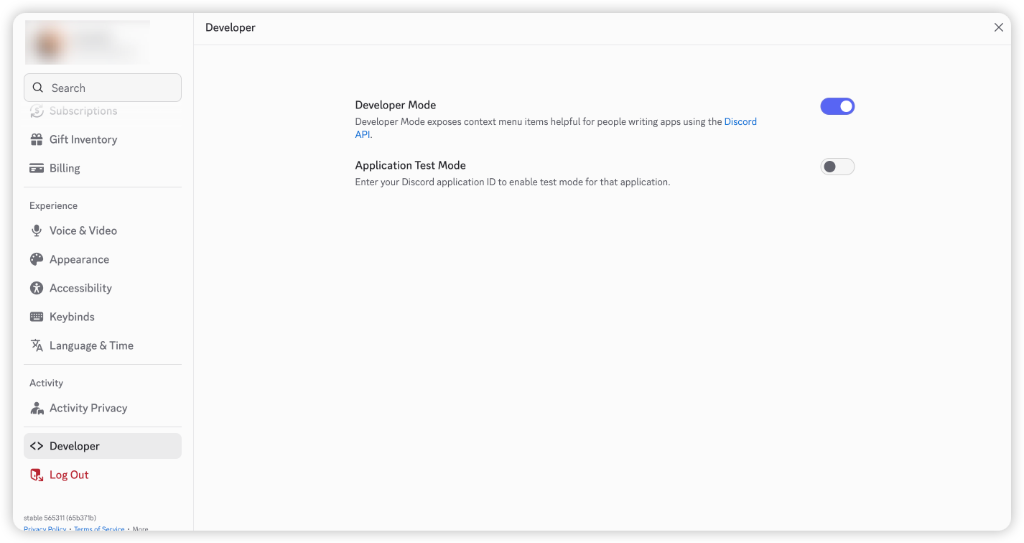
Step 1: Enable Developer Mode
Discord only shows the copy-ID menu after Developer Mode is enabled.
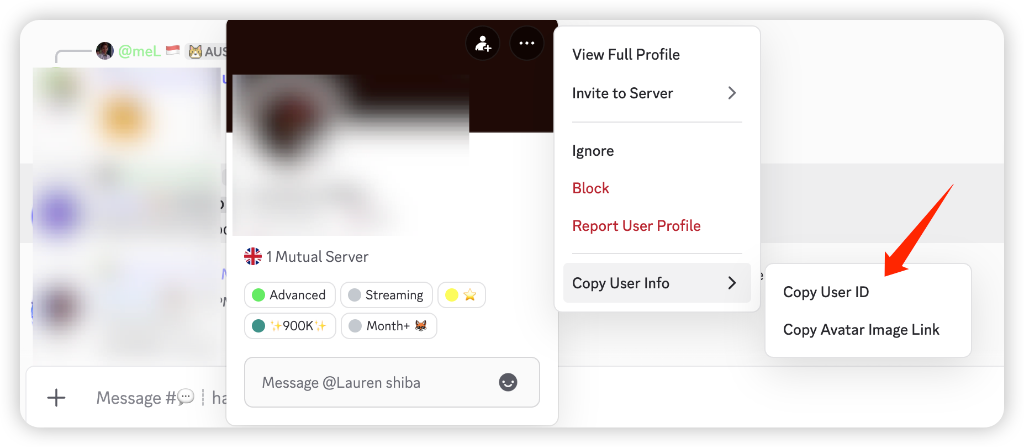
The current menu label is usually Copy User ID. Some Discord versions may place it under Copy User Info or shorten it to Copy ID.
Desktop or Web
- Open Discord and click the User Settings (gear icon) at the bottom left.
- Scroll down the left sidebar and click Advanced.
- Find Developer Mode and toggle it on.
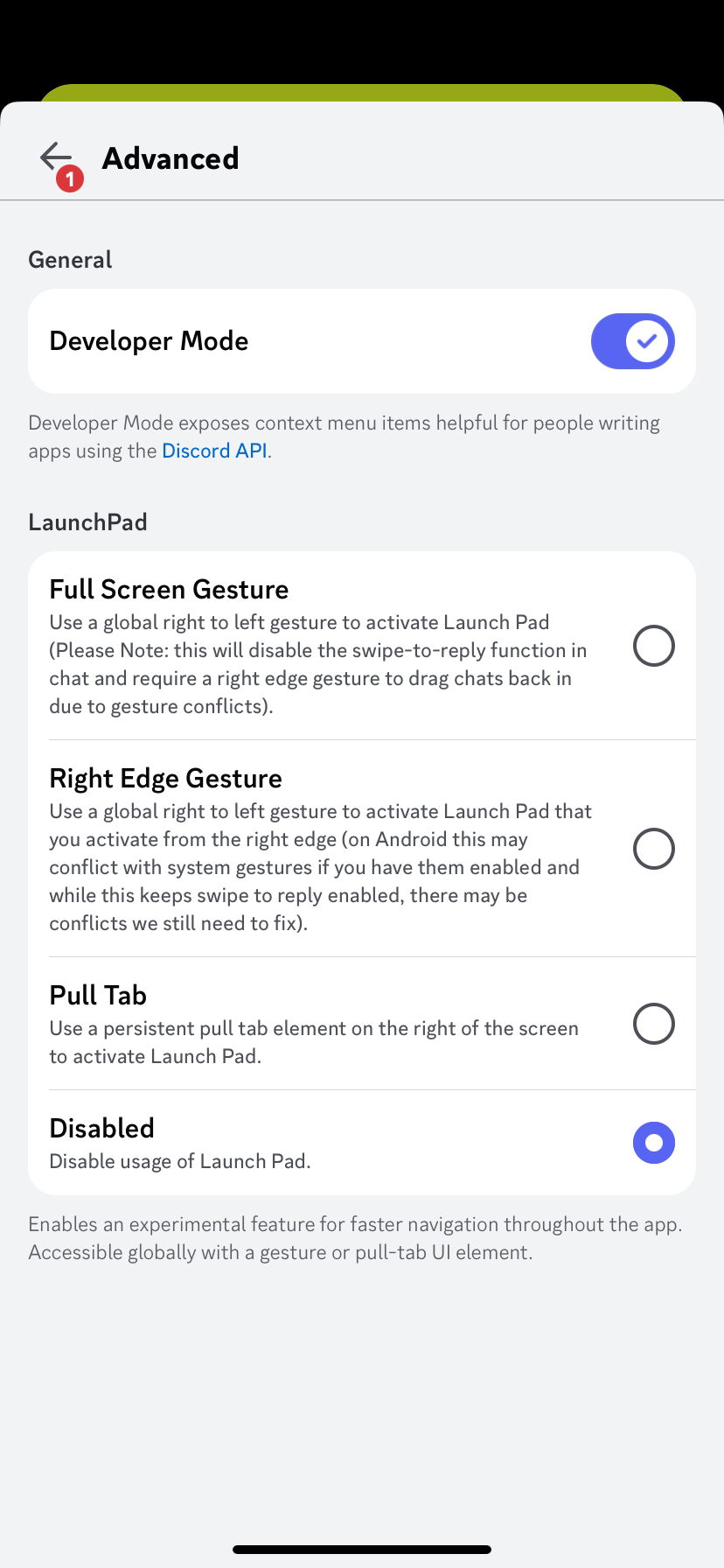
Mobile
- Open the Discord app and tap your profile/avatar in the bottom navigation.
- Tap the gear icon to open settings.
- Scroll to Advanced under App Settings.
- Turn Developer Mode on.
Step 2: Copy a Discord User ID
After Developer Mode is enabled, find the account in a server, group chat, direct message, or message history. These steps work for your own account or another user.
Desktop or Web
- Find a message or member-list entry for the user.
- Right-click the user's avatar or username.
- Click Copy User ID.
- Paste the result into a note or text field and confirm that it is only a long number.
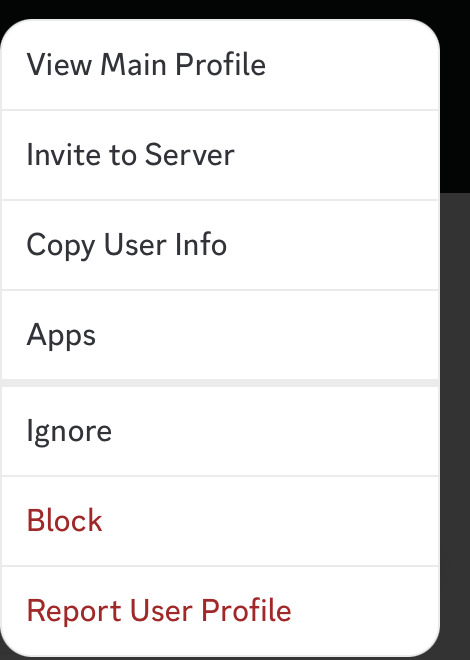
Mobile
- Find the user in a server, group chat, direct message, or message history.
- Tap the user's avatar or username to open the profile card.
- Tap the three-dot menu in the top-right corner.
- Tap Copy User ID. If your version shows Copy User Info, open it and choose the User ID.
To copy your own ID, find one of your own messages and follow the same steps. This is more consistent than looking for the option on the main account settings screen.
If You Only Know the Username
Many people start with a username, display name, or server nickname instead of a numeric ID. That is normal, but Discord lookup tools need the User ID because names can change and are not always unique enough to identify the right account.
If you only know the username, first find the person somewhere inside Discord:
- a server member list
- one of their messages
- a direct message
- a group chat
- a profile card shared from a mutual server
After you open the matching profile, follow Step 2 to copy the User ID. Do not paste the username, display name, server nickname, or @handle into a Discord ID lookup field.
Check That You Copied the Right Value
A Discord user ID should be a long number, usually 17 to 20 digits. It should not include @, #, a display name, or a server nickname.
If you copied a username instead of an ID, Discord lookup and Snowflake tools will not be able to decode the account creation time.
What a Discord User ID Can Show
A Discord user ID can be used to decode the Snowflake timestamp behind the account. That is why account age tools can estimate when the account was created.
Depending on what public profile data is available, a lookup may also show public avatar, banner, accent color, or visible badge information. A user ID does not reveal private messages, email addresses, phone numbers, passwords, private server memberships, or hidden roles.
Use the ID in DiscordLookup
Open the Discord ID Lookup Home page, paste the numeric ID into the search bar, and check the account creation date, account age, public avatar status, banner status, and visible badges when available.